
Key Requirements for connecting to OPC Databases
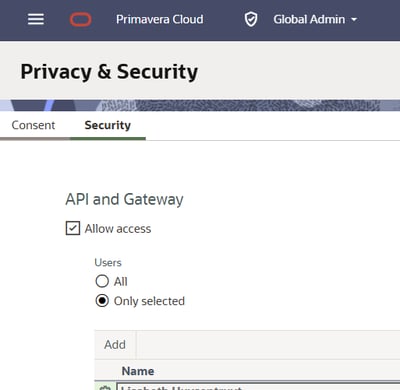
Check that API and Gateway access is enabled in your OPC database's Privacy and Security settings:
Configuring Turbo-Chart connection
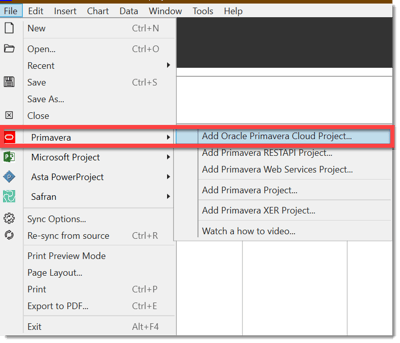
For a new file, or a new dataset, select FILE>PRIMAVERA>Add Oracle Primavera Cloud Project from the menu:
Next a screen will appear to enter the URL , Username and password you use to access your OPC Database, the entered values should look similar to below:
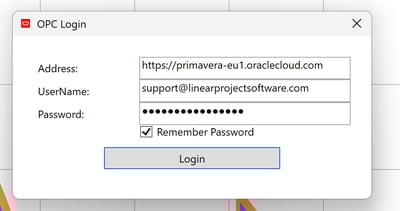
If you do not know your URL, please contact your IT Department or OPC database administrator for details.
If you are unable to connect or have any issues, please make a note/screenshot of any error messages being received via screenshots and either Raise a Ticket or send us an email to support@linearprojectsoftware.com
Select Projects and Import Data Fields
When your connection is successful, you will be shown the data import screen, that lets you select the projects to import and the data fields to map the data into Turbo-Chart:
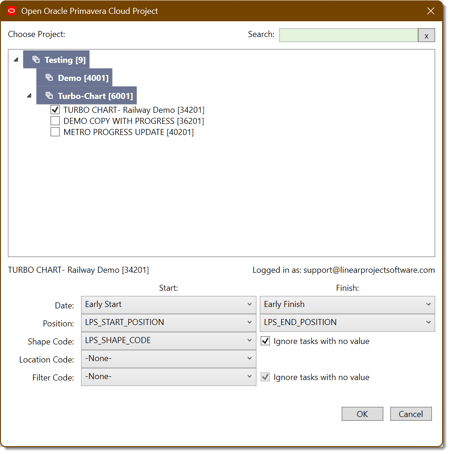
Click "OK" and the data will be imported into your Turbo-Chart dataset. As your OPC schedule changes, You can simply Re-Sync (CTRL+R) to refresh the data from OPC into Turbo-Chart .