
When printing or exporting to PDF, or using the built-in HTML Viewer generator, the chart may appear to be very small in the print area, or there may be no tasks visible on the chart. The likely issue for this is annotations being displayed off the main chart area.
To confirm if annotations are the issue
- Go to CHART>SHOW ANNOTATIONS, and untick this option, so that annotations are not shown.
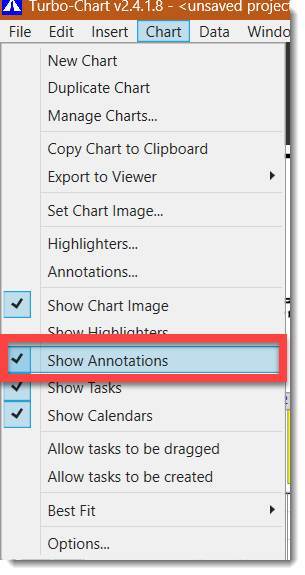
- Then try generating the PDF or HTML file again from CHART>EXPORT to VIEWER
If this image renders correctly, then there is an annotation on your chart that is being shown “off” the chart itself and therefore making the chart page appear small, you can re-position this annotation or delete it.
Fixing Annotations
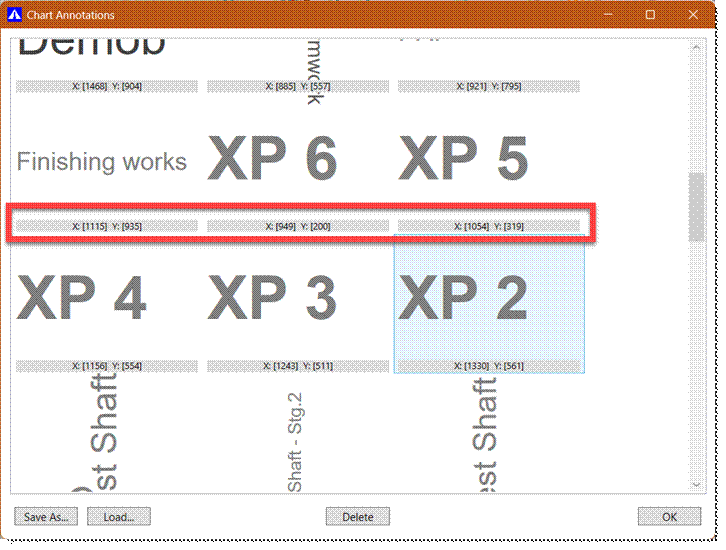
You can find the annotations that are off the chart by selecting CHART>ANNOTATIONS from the menu, and looking through the list of annotations for any one that has odd numbers in the X: and Y: positions (either extremely high, or zero values) as shown below:
If this doesn’t resolve the issue – please contact us and if possible provide teh *tchart file to allow us to investigate further.