
Understanding the issue
Technical issues can occur due to many reasons, to better understand the cause and how we might be able to resolve them, please follow the steps below:
a) Make a note of any error messages that appear and if possible take a screenshot of the issue (WindowsKey+Shift+S)
b) Try to remember what was the action taken when the error occurred. for example, clicking in a cell, selecting an item, or trying to import.
c) Has the problem occurred before, or just once? Are you able to check if any other Turbo-Chart users have the same issue?
d) If the issue is connecting or access data, are other users having the issue, or just your own instance?
Providing information to us:
The following assists us in resolving the issue:
Tchart file
1) If possible send us the Turbo-Chart file (*.tchart) facing the problem, the file contains all the Turbo-Chart information. All support is covered by the Support and Maintenance Terms if confidentiality concerns apply.
Notes and Screenshots
2) Send any of the above notes and/or screenshots
Logfile
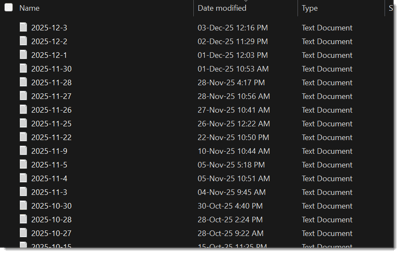
3) Send the latest logfile, this can be found from with Turbo-Chart selecting HELP> Logs from the menu,
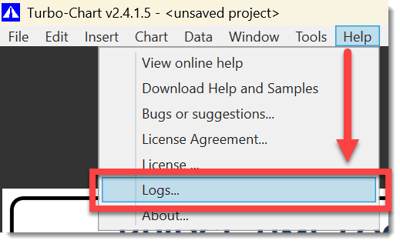
and then finding the file with the most recent date:
Schedule Data
We usually don't need the schedule data, but if you're having problems with copying and pasting, a sample of the data being copied will assist.
If accessing your Database is ana issue, providing a test account to access it ourselves also greatly assists
Contacting Us
You may email us directly at support@linearprojectsoftware.com
or
Clicking on the Ticket Portal Link above.